Backlight and Underglow Brightness Control via Key Press
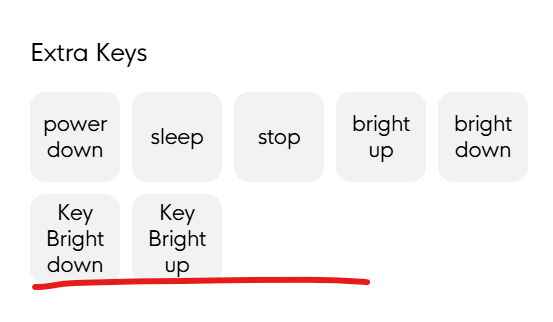
Like with the Knob1, it would be very useful to have these as things you can bind for on the go, when you can’t open Input for any reason (e.g., being in a work environment that disallows external software that isn’t whitelisted).
- Product
- Creator Micro v2, Input
Log in to comment and vote
Comments4
Davide // Work Louder
Jan 8
Hi @Legendary-Wizard thanks for your feedback!
How do you see this working compared to the current brightness settings in Input? Should it override or adjust the configured brightness? And would you expect it to control both the backlight and underglow, or just one of them?
Curious to hear your thoughts on this.
Scott Lanning
Jan 10
Not sure if feature requested is explicit so clarifying below:
PROBLEM:
‘Input’ for CM2 is missing bindings ‘Key Bright down’ and ‘Key Bright up’.
Thus, I have no way to control the brightness of my CM2 without opening ‘Input’ app and adjusting the settings via the menu below.
It looks like this is unique to the CM2 since legendary-wizard confirmed that Input shows RGB-bindings for Knob1 found under ‘Basic —> Extra Keys’ (see screenshot in original post)
SOLUTION:
Add key-bindings for RGB attributes and ensure consistency across products (Knob, Framers, CM2, Nomad, etc) where applicable. The bindings for Knob1 are organized under ‘Extra Keys’ but I think it makes more sense to create a new RBG section. More forward looking assuming future additions.
Priority bindings are the 6 to left in screenshot
Other bindings shown to right that appear to be common in other tools and may be seen as a net feature-loss without them
@Davide // Work Louder
@Legendary-Wizard thanks for posting